Nightly Download
Nightly Web
This nightly polishes up mesh deformation UI, as well as some general QoL:
Mesh Deformation
- 'Edit Vertices' now has a hotkey (default:
V)
- 'Bind Verts' mode has been replaced with double-clicking vertices to bind/unbind them
- Multiple vertices can be selected by holding
ctrl/cmd/shift
- Dragging vertices now more stable under binds (binding/unbinding still causes vertex jumps for now)
- Removed triangles don't come back when adding/removing vertices (unless their area was affected by mesh generation)
Selected Vertex UI
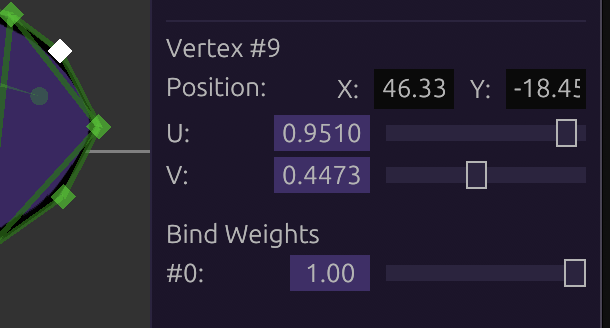
Previously, vertices could only be positioned by dragging them around. Their UVs were also not editable, making mesh edits potentially destructive if you cut off a vertex with the UV that you needed.
Selected vertices now show up in the right panel, letting you edit their position, UV, and bind weights with numerical precision:
Draggable Inputs
Note: currently not available for web
Bone transform inputs (position, scale, rotation) can now be dragged:
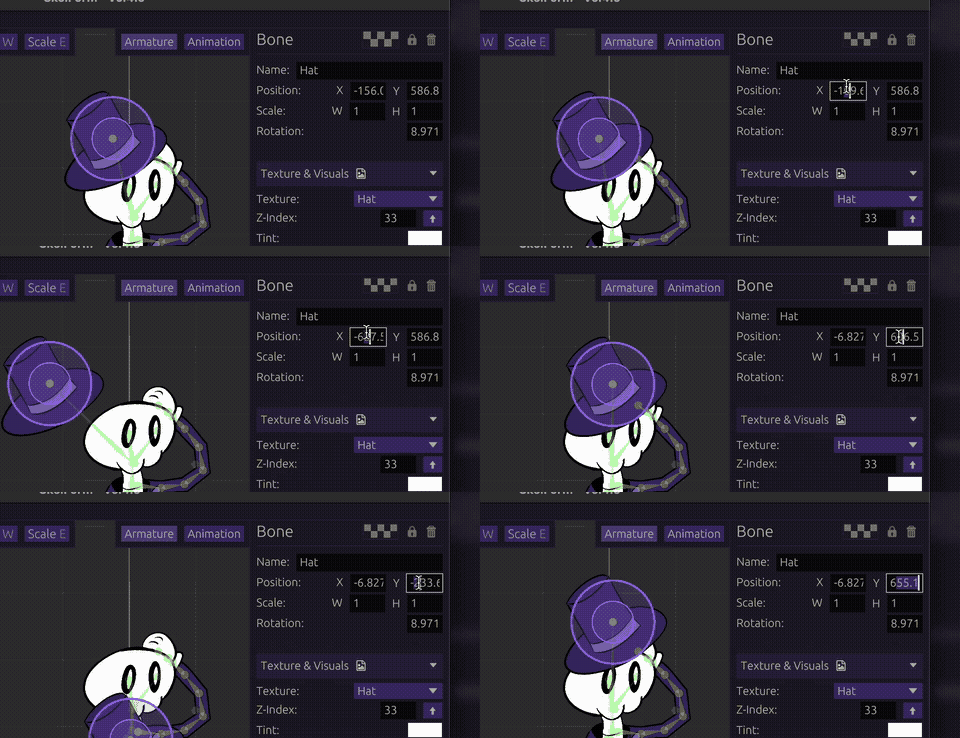
Currently only applies to the above inputs.
Global Z-Index Helper
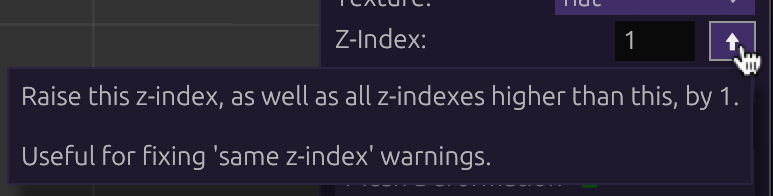
For warnings pertaining to conflicting Z-indices, the solution was to increase either of the offending bone by +1. However, this often requires raising every other bone's Z-index to prevent further conflicts.
A bone's Z-index can now be raised by 1 while automatically raising all other bones with a higher Z-index:
Bone Armature Hotkeys
Often, multiple micro-adjustments need to be made to several bones in close proximity to each other (within the hierarchy). They can now easily be navigated using hotkeys (all customizable):
Z - previous boneX - next boneC - toggle bone fold